Custom OAuth provider
Integrate any OAuth 2.0–compliant IdP (Custom through Custom10).
:::note Custom providers must use standard 3-legged OAuth. Responses from Token URL and UserInfo URL must match the formats below. :::
Use Custom OAuth to connect Hanzo IAM to any OAuth 2.0–compliant service: internal IdPs, self-hosted auth, or third-party services not yet built-in. You can add up to 10 custom providers: Custom, Custom2, … Custom10, each with its own config.
Create a custom provider
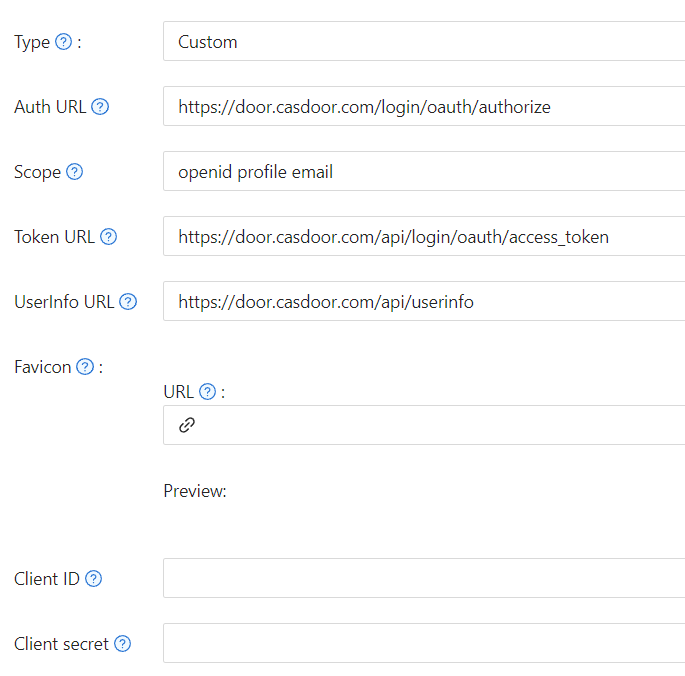
In Hanzo IAM Providers → Add, set Type to one of Custom, Custom2, … Custom10. Fill in Client ID, Client Secret, Auth URL, Scope, Token URL, UserInfo URL, and Favicon.
-
Auth URL — OAuth authorization endpoint. Example: with
https://iam.hanzo.ai/oauth/authorize, the browser is sent tohttps://iam.hanzo.ai/oauth/authorize?client_id={ClientID}&redirect_uri=https://{your-iam-hostname}/callback&state={State_generated_by_Hanzo IAM}&response_type=code&scope={Scope}`With Enable PKCE on, Hanzo IAM adds:
&code_challenge={code_challenge}&code_challenge_method=S256The IdP must then redirect to
https://{your-iam-hostname}/callback?code={code}After this step, Hanzo IAM will recognize the code parameter in the URL.
-
Scope — Scope string sent to the Auth URL (per your IdP’s docs).
-
Enable PKCE — When on, Hanzo IAM sends
code_challenge/code_challenge_method=S256in the auth request andcode_verifierin the token request. Enable if your IdP requires or supports PKCE. -
Token URL — Token endpoint. Hanzo IAM calls it with the code to get an access token. Example:
curl -X POST -u "{ClientID}:{ClientSecret}" --data-binary "code={code}&grant_type=authorization_code&redirect_uri=https://{your-iam-hostname}/callback" https://iam.hanzo.ai/oauth/tokenWhen PKCE is enabled, the request includes the code verifier:
curl -X POST -u "{ClientID}:{ClientSecret}" --data-binary "code={code}&grant_type=authorization_code&redirect_uri=https://{your-iam-hostname}/callback&code_verifier={code_verifier}" https://iam.hanzo.ai/oauth/tokenResponse must include at least:
{ "access_token": "eyJhbGciOiJSUzI1NiIsImtpZCI6Ixxxxxxxxxxxxxx", "refresh_token": "eyJhbGciOiJSUzI1NiIsInR5cCI6xxxxxxxxxxxxxx", "token_type": "Bearer", "expires_in": 10080, "scope": "openid profile email" } -
UserInfo URL — API to get user info with the access token. Hanzo IAM calls it like:
curl -X GET -H "Authorization: Bearer {accessToken}" https://iam.hanzo.ai/oauth/userinfoResponse must include at least:
{ "name": "admin", "preferred_username": "Admin", "email": "admin@example.com", "picture": "https://hanzo.ai/logo.svg", "phone": "+1234567890" }phoneis optional; if present, it is stored as the user’s phone in Hanzo IAM. -
Favicon — URL of the provider logo shown on the Hanzo IAM login page.
How is this guide?
Last updated on